


Choose Category → Set Image Position (Left/Right) → Show Your Clean List!
The easiest way to stack your articles in a clean, vertical column. Perfect for sidebars and list layouts with flexible image alignment. No coding required.
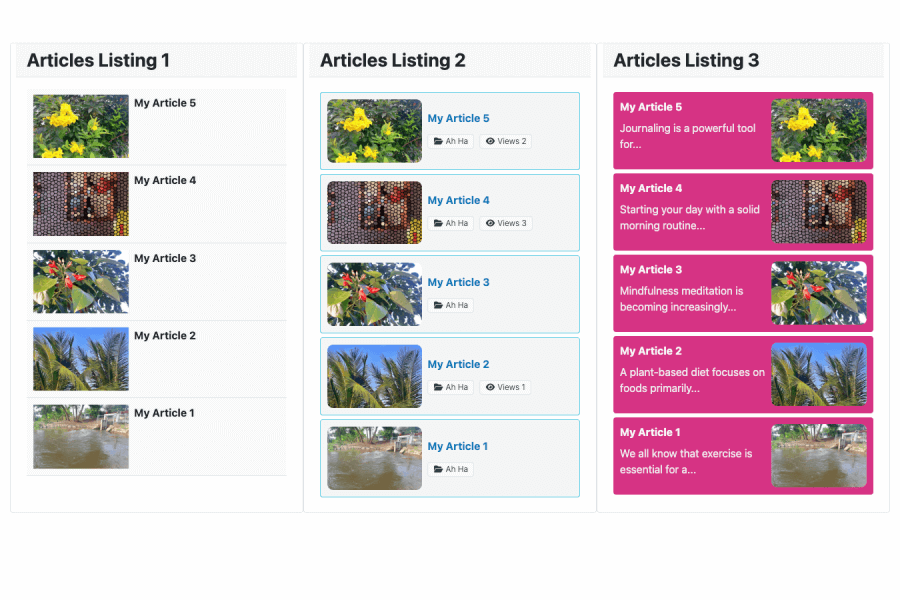
Need a neat, organized way to showcase your recent posts on your sidebar or main content area? If you want a classic, professional vertical list of articles without wrestling with complex templates, this module is built just for you.
Meet Article Column - Xiroweb; the simplest way to display your articles stacked in a single vertical column with flexible layouts.
Get your clean article column live in 3 quick steps
Pick the category of Joomla articles you want to present in your list.
Easily decide whether you want the article images to sit on the left or the right side of the text.
Assign the module to your sidebar, footer, or content area. No coding or HTML adjustments needed!
Engineered strictly for ease of use, this module neatly stacks your content vertically. It is fully responsive, ensuring your article list flows beautifully on mobile phones, tablets, and desktops.
A great vertical list needs to fit perfectly into your website’s style. Article Column - Xiroweb gives you quick, flexible options:
This module is highly optimized and lightweight, meaning it runs flawlessly out-of-the-box when meeting these simple setups:
For clean column alignments, make sure your Joomla template utilizes Bootstrap 5 (standard in modern Joomla templates).
Make sure your articles have an Intro Image set so the left/right image alignment displays beautifully!
Publish this module in your "sidebar" template position to instantly create a "Most Popular" or "Latest News" widget just like professional blogs!
Don't worry about how your list looks on small screens. Setting up mobile alignments can be tough for beginners, but Article Column - Xiroweb does it for you.
Using Bootstrap 5's mobile-first principles, the module automatically scales down images and ensures that text wrapping adjusts fluidly to keep the layout clean and highly readable.
Zero setup required: Your vertical column layout is fully responsive by default. No media queries or manual code adjustments needed!
Enjoy an incredibly easy, fast, and gorgeous vertical layout with Article Column - Xiroweb.